Achieve Financial Freedom in Vampire Survivors, Part1 - write CE script & locate key value
从这学期的期末开始,沉迷了一段时间的《吸血鬼幸存者》. 里面的主被动搭配、隐藏内容都非常丰富,但是有一点让我感到略微不满——就是过于变态的局外成长。依稀记得打到深海神殿的尽头,发现只有一个卖东西的奸商,而且卖的两项东西还都好贵!
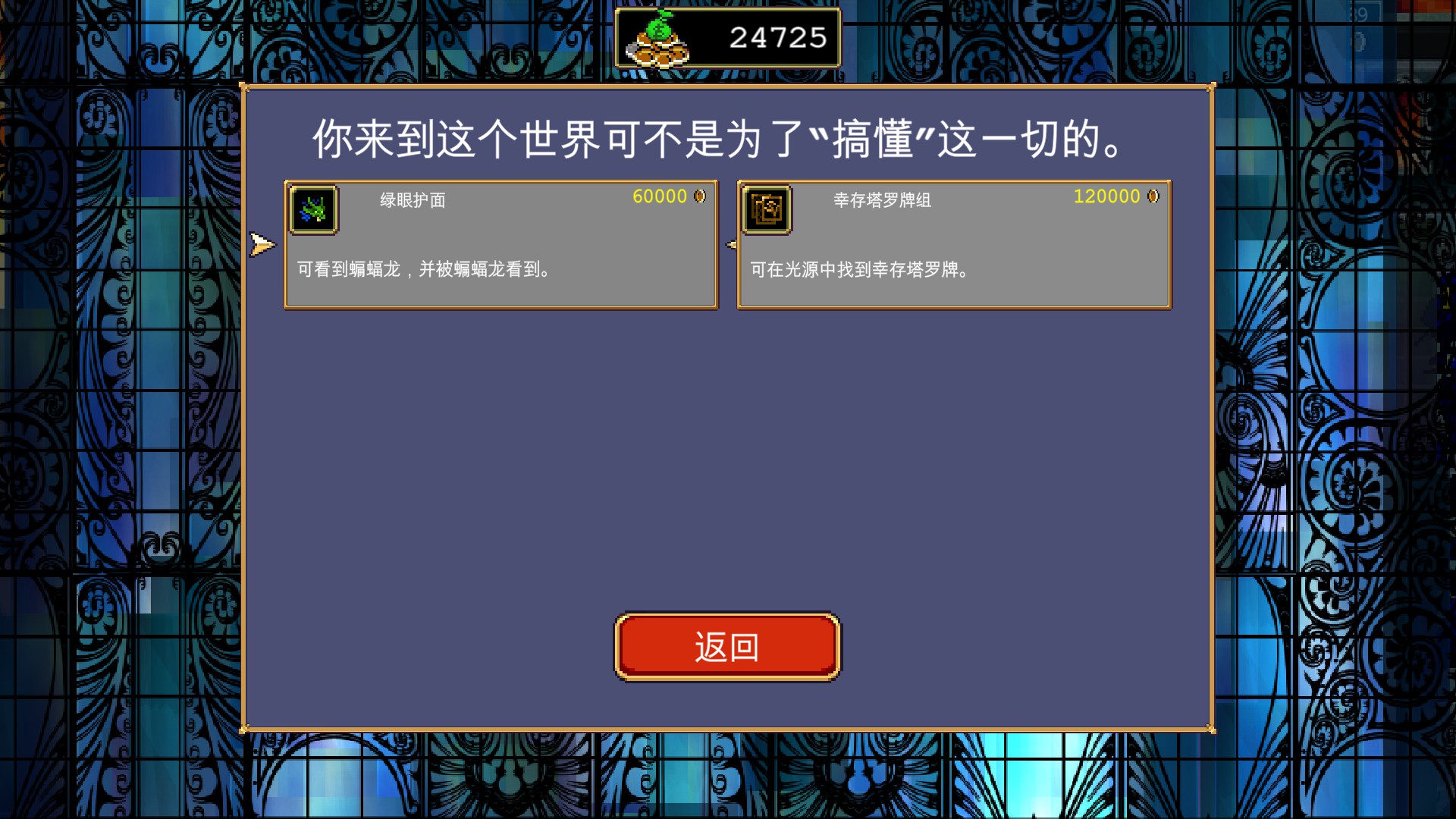
我第一次接触CE是在《空洞骑士》里升级3个易碎护符,玩过的小伙伴应该都知道这个价格有多变态了;第二次是《矿坑之下》,这位更是重量级,语言无法描述的抽象,游戏内容还挺不错的,但局外成长的金币数值是拿脚填的吧…前两次修改可以说是一帆风顺,无非就是搜索整数值,然后游戏里打打怪让金币变化,再搜几遍,最后change value. 可是轮到《吸血鬼幸存者》的时候,却失效了. 我以前也确实在社区听见过“这个游戏的数值有加密”之类的说法,真的如此吗?我决定一探究竟.
0x01 定位加密数值:候选
面对加密的数值,我们不能搜索精确的数值,也不能给出范围。甚至当我们的实际金币增减的时候,无法预测加密后的数值是怎么变化的。我们唯一能够利用的只有一个标准:数值是否改变.
所以我们选择4字节数据,Unknown initial value, 在游戏中通过一些操作来改变金币的数值,进行change/unchange的筛选。我的快捷键绑定如下:C-h unchanged,C-l changed, C-j decreased, C-k increased. 因为是加密数值,所以我们只能使用前两个.
由于这个游戏的商店存在一个“重置强化点数”的功能,能够返还金币来重新分配点数,所以不用担心金币花光的问题,这给我们的定位带来了很大的便利.
有趣的是,在降低到200多个候选地址的时候,凭借chage/unchage就不怎么筛得动了. 然后偶然发现退出这个界面,点点其它的(比如图鉴)然后再回来搜一下unchange, 瞬间就变成十几个了。最后稳定到了7个.
在进行定位的时候,多尝试不同的操作,来提高把噪声和目标数据“错开”的可能性
其中两位数的明显信息熵不足,所以只需要考虑其它的几个.
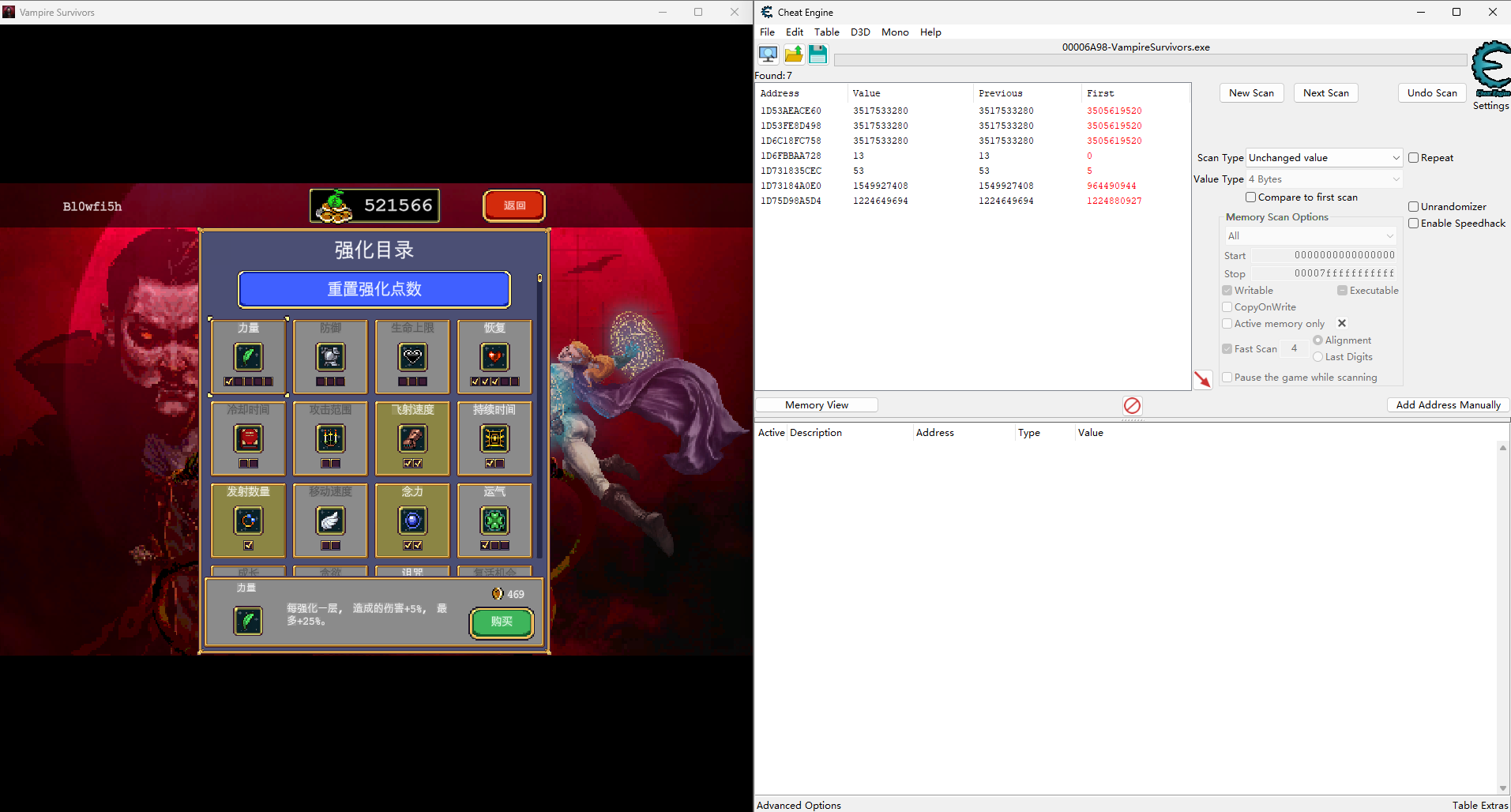
老实说,一开始我看前三个内存对应同样的数据,还以为这一定就是加密的金币了。但是为了保险起见,还是把5个全部加进去了,结果最后…金币还真不在前三个之中…(当然这是后话了)
0x02 编写CE脚本进行批量化监控
其实我一开始并不是通过商店操作来进行定位的,而是尝试找单局游戏新增的金币,所以选择了莫利塞那张地图,但是最后还是剩了20个候选地址,这种情况下,在我们每次手动设置”Find out what writes to this address”之后,都需要重新进入游戏来执行一次改变金钱的操作,然后回去继续分析pc, 实在是太过麻烦。
现在我换成了在商店消费、直接定位当前总金币的方法,虽然这次只有5个结果,理论上可以手动分析,但是我还是想尝试一下更通用的方法,以备不时之需。
我的初步思路是:既然CE能够支持我们对一个地址设置“写入断点”,我们应该也可以编写脚本来批量运行。在一个断点被触发后,执行回调函数、自动切换到下一个断点,所以我们只需要在游戏中执行操作就行了.
在CE中,选择 “Table” -> “Show Cheat Table Lua Script”可以运行lua脚本
step1 获得地址列表
在CE中我们可以把一些地址加入addresslist中,那么我们的第一步就是访问这个地址列表,为后续的轮流监控做准备.
1
2
3
4
5
6
7
8
-- getAddressList() returns an object with type "Addresslist"
local addresslist = getAddressList()
local addresses = {}

for i = 0,addresslist.Count - 1 do
    local record = addresslist[i]
    print(i..":"..record.Address)
end
table
lua中的array和map都是以一种叫做”table”的数据结构存储的
使用
table.insert(my_table, position, element)可以向table的特定位置插入元素,其中第二个参赛position可以省略,此时代表从末尾插入。注意:lua中的table索引是从1开始的! 向开头插入可以表示如下:
table.insert(fruits, 1, "watermelon")
尽管lua的索引从1开始,但是CE的一些结构风格还是采用的非lua形式,也即从0开始,所以上面我们遍历addresslist的时候,用的是
for i =0, addresslist.Count-1
接着,我们来构建一个全局table, 存储所有的candidate地址,在后续对它们进行轮流监控:
1
2
3
4
5
6
7
8
9
10
11
12
13
14
15
16
17
18
WriterProbe = {
    curr_idx = 1,       -- the current bp idx. start with the first bp address
    candidateAddresses = {},
    watchSize = 4,
    activeAddress = nil;
    activeExpression = nil,
    seenInstructions = {}
}


-- Prepare memory address where we will set write bp.
local addresslist = getAddressList() -- getAddressList() returns an object with type "Addresslist"
for i = 0,addresslist.Count - 1 do
    local record = addresslist[i]
    -- append target address to candidate list
    table.insert(WriterProbe.candidateAddresses, record.CurrentAddress)
    -- + getAddress ?
end
关于AddressList的更多信息可以参考:
https://wiki.cheatengine.org/index.php?title=Lua:Class:Addresslist
step2 candidate轮询
我们定义一个函数nextCandidate,如果当前还没有开始监控,就选择第一个candidate (idx=1, 再次注意lua的下标从1开始); 否则就清除前一个断点,开启新的断点.
1
2
3
4
5
6
7
8
9
10
11
12
13
14
15
16
17
18
19
20
21
22
local function nextCandidate()
    -- remove last address
    if WriterProbe.activeAddress ~= nil then
        debug_removeBreakpoint(WriterProbe.activeAddress)
        WriterProbe.activeAddress = nil
        WriterProbe.curr_idx = WriterProbe.curr_idx + 1
    end
    local idx = WriterProbe.curr_idx
    if idx > #WriterProbe.candidateAddresses then
        return 1
    end
    WriterProbe.activeAddress = WriterProbe.candidateAddresses[idx]

    -- set Write bp
    debug_setBreakpoint(
        WriterProbe.activeAddress,
        WriterProbe.watchSize,
        bptWrite,       -- bp type
        bpmDebugRegister,
        onCandidateWritten -- TODO
    )
end
我们使用
1
2
3
if idx > #WriterProbe.candidateAddresses then
    return 1
end
作为中止条件.
#是长度运算符, #WriterProbe.candidateAddresses代表这个table的当前元素个数.
重点是debug_setBreakpoint的设置, 它有5个参数. 后三个参数分别表示:断点类型为“write”、采用硬件断点的方式、设置handler函数
https://wiki.cheatengine.org/index.php?title=Lua%3Adebug_setBreakpoint
step3 handler函数
接着我们设计在某个内存写入断点被触发的时候,执行的回调函数.
1
2
3
4
5
6
7
8
9
10
11
12
13
14
15
16
17
18
19
20
21
22
23
24
25
26
27
28
local function onCandidateWritten()
    -- dump asm
    local nextInstruction

    if targetIs64Bit() then
        nextInstruction = RIP
    else
        nextInstruction = EIP
    end

    -- x86/x64 数据断点通常在写入完成后触发,
    -- 因此当前 RIP/EIP 往往已经位于写入指令的下一条指令。
    local writerInstruction = getPreviousOpcode(nextInstruction)

    if writerInstruction == nil then
        writerInstruction = nextInstruction
    end
    -- probe +/- 200 asm
    asmSample(writerInstruction, [[C:\Users\woc\Desktop\vampire_ce]] , string.format("%d-%X.txt", WriterProbe.curr_idx, WriterProbe.activeAddress))

    print(string.format("%d, %x, %x", WriterProbe.curr_idx, WriterProbe.activeAddress, writerInstruction))
    --
    nextCandidate()

    -- important! resume the process
    debug_continueFromBreakpoint(co_run)
    return 1
end
我们期望通过一个函数asmSample (TODO) 来将当前的pc值前后进行采样. 其中需要额外注意的点是,CE中硬件断点触发后,停下来的位置一般是执行Read/Write/Access操作的下一条指令,所以真正的writerInstruction需要通过getPreviousOpcode来找到.
然后,调用nextCandidate()来切换到下一个断点.
最后,在触发硬件断点后,程序被中断了,我们需要通过debug_continueFromBreakpoint恢复,并且返回1.
step4 汇编采样函数
1
2
3
4
5
6
7
8
9
10
11
12
13
14
15
16
17
18
19
20
21
22
23
24
25
26
27
28
29
30
31
32
33
34
35
36
37
38
39
40
41
42
43
44
45
46
47
48
49
50
51
52
53
local function asmSample(pc, dir, name)
    local probe_len = 200
    local sample_addresses = {}
    table.insert(sample_addresses, pc)
    -- prev
    local cursor = pc
    for i = 1, probe_len do
        local previous = getPreviousOpcode(cursor)
        if previous == nil then
            break
        end
        -- lua table start with idx 1
        table.insert(sample_addresses, 1, previous)
        cursor = previous
    end
    -- next
    cursor = pc
    for i = 1, probe_len do
        local instr_size = getInstructionSize(cursor)
        if instr_size == nil then
            break
        end
        cursor = cursor + instr_size
        table.insert(sample_addresses, cursor)
    end
    -- open file and write
    local file, err = io.open(dir.."\\"..name, "w")
    if not file then
        print("Cannot open file:"..tostring(err))
        return false
    end
    for _, address in ipairs(sample_addresses) do
        -- pcall provides "safe execution".
        local ok, asm = pcall(disassemble, address)
        if ok and asm then
            local marker
            if address == pc then
                marker = "=> "
            else
                marker = "   "
            end

            file:write(marker .. asm .. "\n")
        else
            file:write(string.format(
                "   0x%X - <disassemble failed>\n",
                address
            ))
        end
    end
    file:close()
    return true
end
设置采样深度为200. 在CE脚本中,在当前的地址为x时,上一条指令可以通过getPreviousOpcode(x)得到,下一条指令可以通过x + getInstructionSize(x)得到.
当上述两个函数返回为nil的时候,反汇编失败,这时候就算没有采够200条,也中止循环.
ipairs是lua的iter函数
pcall可以更安全地调用某个函数. 这里它判断
disassemble(address)是否执行成功
step5 汇总
我们的最终脚本如下:
1
2
3
4
5
6
7
8
9
10
11
12
13
14
15
16
17
18
19
20
21
22
23
24
25
26
27
28
29
30
31
32
33
34
35
36
37
38
39
40
41
42
43
44
45
46
47
48
49
50
51
52
53
54
55
56
57
58
59
60
61
62
63
64
65
66
67
68
69
70
71
72
73
74
75
76
77
78
79
80
81
82
83
84
85
86
87
88
89
90
91
92
93
94
95
96
97
98
99
100
101
102
103
104
105
106
107
108
109
110
111
112
113
114
115
116
117
118
119
120
121
122
123
124
125
126
127
128
129
130
131
132
133
134
135
136
137

WriterProbe = {
    curr_idx = 1,       -- the current bp idx. start with the first bp address
    candidateAddresses = {},
    watchSize = 4,
    activeAddress = nil;
    activeExpression = nil,
    seenInstructions = {}
}


-- Prepare memory address where we will set write bp.
local addresslist = getAddressList() -- getAddressList() returns an object with type "Addresslist"
for i = 0,addresslist.Count - 1 do
    local record = addresslist[i]
    -- append target address to candidate list
    table.insert(WriterProbe.candidateAddresses, record.CurrentAddress)
    -- + getAddress ?
end


if not debug_isDebugging() then
    debugProcess()
end


local function asmSample(pc, dir, name)
    local probe_len = 200
    local sample_addresses = {}
    table.insert(sample_addresses, pc)
    -- prev
    local cursor = pc
    for i = 1, probe_len do
        local previous = getPreviousOpcode(cursor)
        if previous == nil then
            break
        end
        -- lua table start with idx 1
        table.insert(sample_addresses, 1, previous)
        cursor = previous
    end
    -- next
    cursor = pc
    for i = 1, probe_len do
        local instr_size = getInstructionSize(cursor)
        if instr_size == nil then
            break
        end
        cursor = cursor + instr_size
        table.insert(sample_addresses, cursor)
    end
    -- open file and write
    local file, err = io.open(dir.."\\"..name, "w")
    if not file then
        print("Cannot open file:"..tostring(err))
        return false
    end
    for _, address in ipairs(sample_addresses) do
        -- pcall provides "safe execution".
        local ok, asm = pcall(disassemble, address)
        if ok and asm then
            local marker
            if address == pc then
                marker = "=> "
            else
                marker = "   "
            end

            file:write(marker .. asm .. "\n")
        else
            file:write(string.format(
                "   0x%X - <disassemble failed>\n",
                address
            ))
        end
    end
    file:close()
    return true
end

local nextCandidate
-- callback function
local function onCandidateWritten()
    -- dump asm
    local nextInstruction

    if targetIs64Bit() then
        nextInstruction = RIP
    else
        nextInstruction = EIP
    end

    -- x86/x64 数据断点通常在写入完成后触发,
    -- 因此当前 RIP/EIP 往往已经位于写入指令的下一条指令。
    local writerInstruction = getPreviousOpcode(nextInstruction)

    if writerInstruction == nil then
        writerInstruction = nextInstruction
    end
    -- probe +/- 200 asm
    asmSample(writerInstruction, [[C:\Users\woc\Desktop\vampire_ce]] , string.format("%d-%X.txt", WriterProbe.curr_idx, WriterProbe.activeAddress))

    print(string.format("%d, %x, %x", WriterProbe.curr_idx, WriterProbe.activeAddress, writerInstruction))
    --
    nextCandidate()

    -- important! resume the process
    debug_continueFromBreakpoint(co_run)
    return 1
end

-- remove last bp (if exists), and move to next candidate
nextCandidate = function()
    -- remove last address
    if WriterProbe.activeAddress ~= nil then
        debug_removeBreakpoint(WriterProbe.activeAddress)
        WriterProbe.activeAddress = nil
        WriterProbe.curr_idx = WriterProbe.curr_idx + 1
    end
    local idx = WriterProbe.curr_idx
    if idx > #WriterProbe.candidateAddresses then
        return 1
    end
    WriterProbe.activeAddress = WriterProbe.candidateAddresses[idx]

    -- set Write bp
    debug_setBreakpoint(
        WriterProbe.activeAddress,
        WriterProbe.watchSize,
        bptWrite,       -- bp type
        bpmDebugRegister,
        onCandidateWritten
    )
end

-- set the first bp
nextCandidate()
其中新增的内容有:
- 附加调试器
1
2
3
if not debug_isDebugging() then
  debugProcess()
end
- 并且手动设置第一个断点:
1
nextCandidate()
- 此外,注意到
onCandidateWritten和nextCandidate互相调用,所以我们需要将后面的函数提前声明,然后再赋值.1 2 3 4 5 6 7
local nextCandidate local function onCandidateWritten() -- end nextCandidate = function() -- end
[[C:\Users\woc\Desktop\vampire_ce]]相当于"C:\\Users\\woc\\Desktop\\vampire_ce"
0x03 sample dump & analyze
运行脚本后,只需要在程序中触发几次金币变化的操作,即可发现生成了几个文件:
1
2
3
4
5
1-1D53AEACE60.txt
2-1D53FE8D498.txt
3-1D6C18FC758.txt
4-1D73184A0E0.txt
5-1D75D98A5D4.txt
丢给ai分析,给出的头号嫌疑犯是5号,并让我检查esi是否是商品售价,而[rax+0x94]是拥有的金币.
1
2
3
4
5
   7FFBD93EB0EC - F3 0F10 80 94000000  - movss xmm0,[rax+00000094]
   7FFBD93EB0F4 - 66 0F6E CE  - movd xmm1,esi
   7FFBD93EB0F8 - 0F5B C9  - cvtdq2ps xmm1,xmm1
   7FFBD93EB0FB - E8 F027EDFD - call 7FFBD72BD8F0
=> 7FFBD93EB100 - F3 0F11 87 94000000  - movss [rdi+00000094],xmm0
在7FFBD93EB0F4下断点: 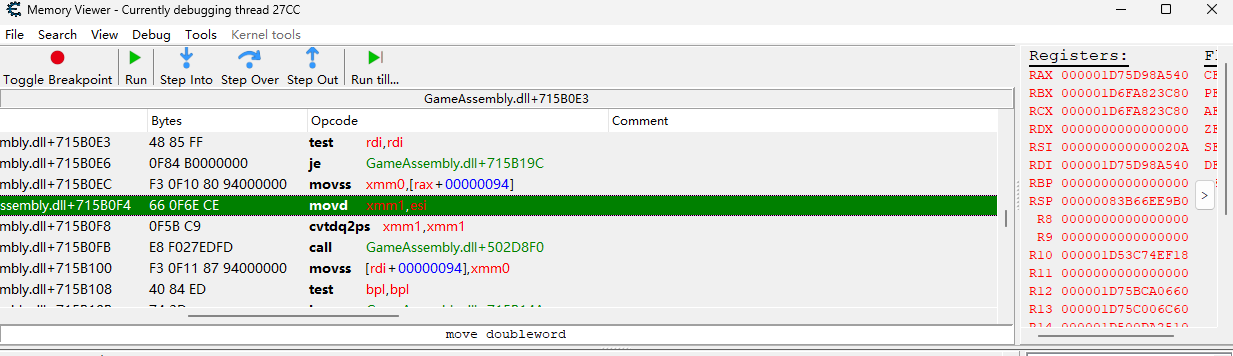 我刚刚购买的物品价格为522,刚好对应
edi=0x20A. 那么接下来再检查一下[rax+0x94]==0x1D75D98A5D4
消费前后,金币位置对应的数据:
1
2
3
4
>>> 0x48fbad9e
1224453534
>>> 0x48fb6c5e
1224436830   (此时游戏中是514914金币)
嗯?看上去确实是加密的数据?但是…不可能!因为这里的逻辑是固定的减法,应该已经是明文数据了。 仔细一看,原来这里存储的4字节是float类型,被加载到xmm0寄存器中,后续把商品价格加载到xmm1中,再做减法.
进行转换后,0x48fb6c5e -> 514914.937, Perfect! 我们终于找到了金币的数量,它其实并没有被加密,只不过以浮点数形式存储.
0x04 总结
即使有些数据在游戏中的表现形式让你觉得100%是整数,但实际存储方式还真的可能是一个浮点数…
虽然这个游戏其实并没有用到数据加密,但我第一次尝试了CE脚本的编写方法,完全能够自动化处理数据加密、更多候选地址的情况.
未完待续, 我将在后面的几篇blog中完成外挂工具的编写.