Steins;Gate Resources Unpack
前一段时间玩了《命运石之门》本体,尝试对其资源进行解包.
0x01 尝试1: binwalk提取
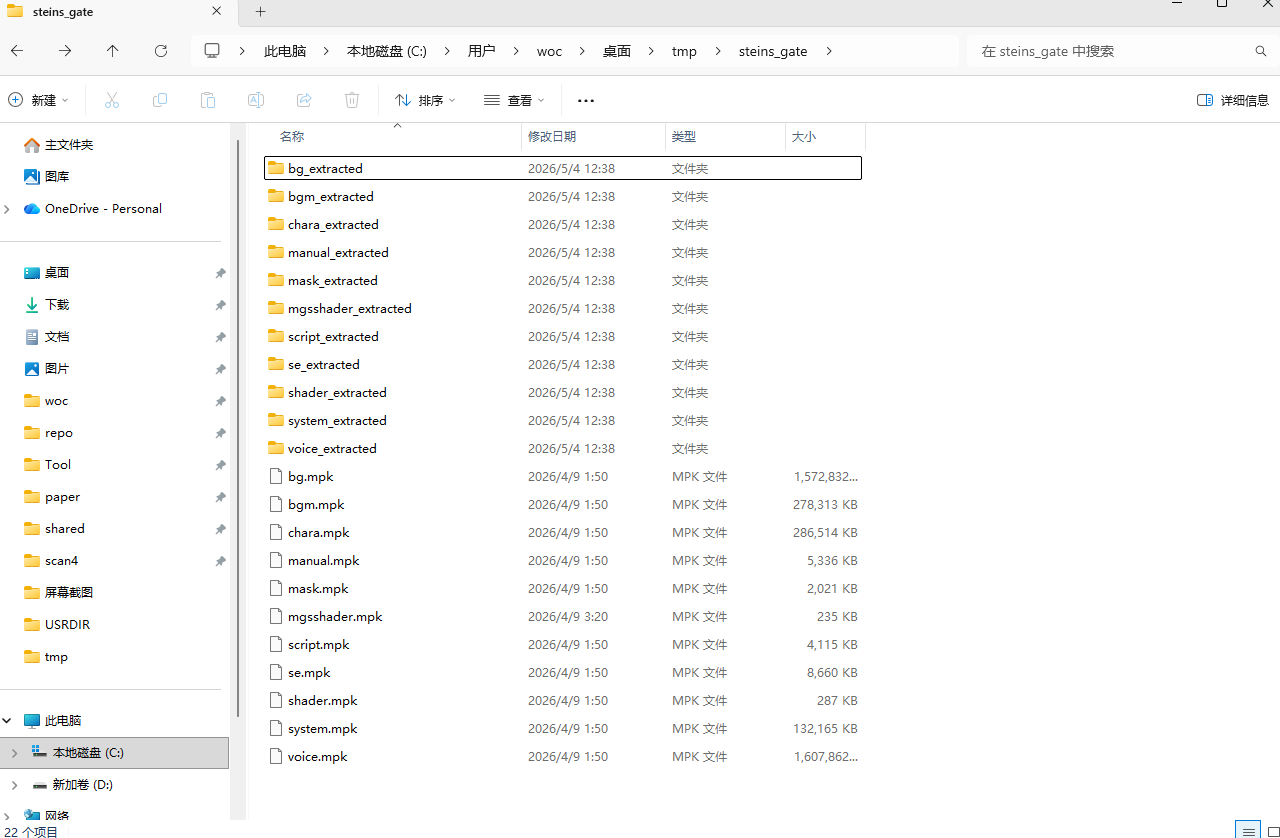
根据名称判断,这些mpk文件应该就是游戏资源.
1
2
3
4
5
6
7
8
9
10
11
12
📦USRDIR
 ┣ 📜bg.mpk
 ┣ 📜bgm.mpk
 ┣ 📜chara.mpk
 ┣ 📜manual.mpk
 ┣ 📜mask.mpk
 ┣ 📜mgsshader.mpk
 ┣ 📜script.mpk
 ┣ 📜se.mpk
 ┣ 📜shader.mpk
 ┣ 📜system.mpk
 ┗ 📜voice.mpk
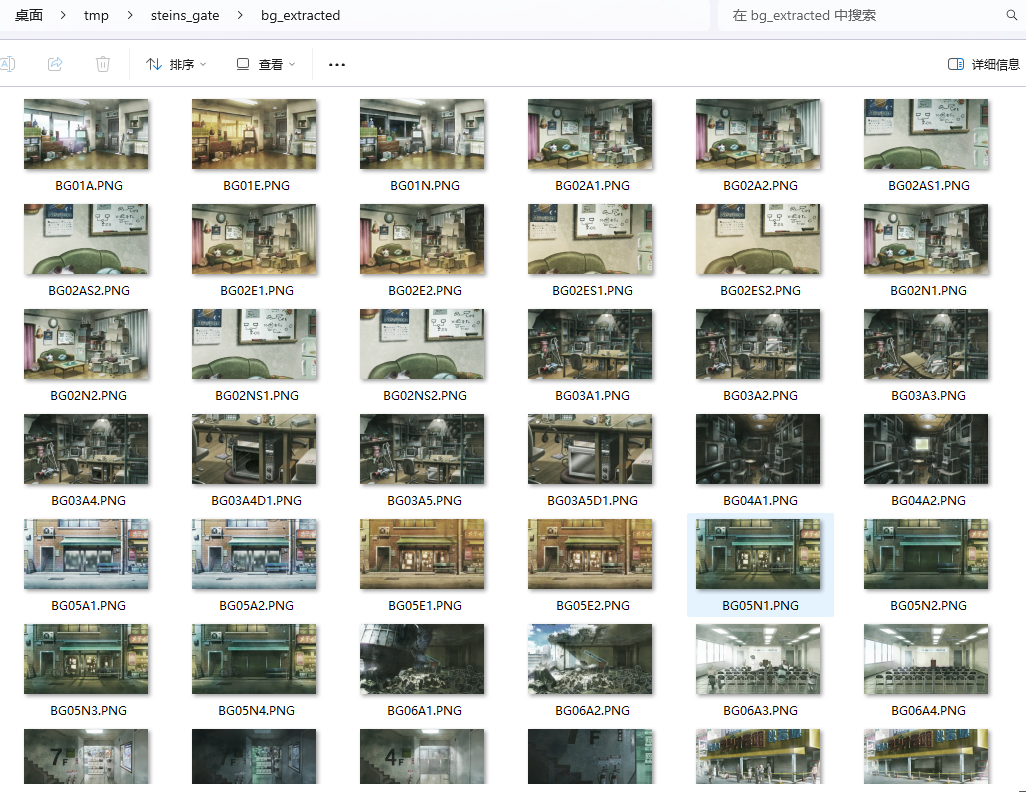
使用binwalk -e进行提取的时候, 能提取bg.mpk, chara.mpk中的图片资源,但是不能提取bgm.mpk中的.ogg文件,原因是binwalk的默认文件签名中,并不包含ogg.
0x02 资源格式分析
查看mpk文件内容:
1
2
3
4
5
6
7
8
9
10
11
12
13
14
15
16
17
18
19
20
21
22
23
24
25
26
27
28
29
30
00000000: 4d50 4b00 0000 0200 fb01 0000 0000 0000  MPK.............
00000010: 0000 0000 0000 0000 0000 0000 0000 0000  ................
00000020: 0000 0000 0000 0000 0000 0000 0000 0000  ................
00000030: 0000 0000 0000 0000 0000 0000 0000 0000  ................
00000040: 0000 0000 0000 0000 0000 0200 0000 0000  ................
00000050: a958 3000 0000 0000 a958 3000 0000 0000  .X0......X0.....
00000060: 4247 3031 412e 504e 4700 0000 0000 0000  BG01A.PNG.......
00000070: 0000 0000 0000 0000 0000 0000 0000 0000  ................
......
00000130: 0000 0000 0000 0000 0000 0000 0000 0000  ................
00000140: 0000 0000 0100 0000 0060 3200 0000 0000  .........`2.....
00000150: fd0e 3200 0000 0000 fd0e 3200 0000 0000  ..2.......2.....
00000160: 4247 3031 452e 504e 4700 0000 0000 0000  BG01E.PNG.......
00000170: 0000 0000 0000 0000 0000 0000 0000 0000  ................
......
00000230: 0000 0000 0000 0000 0000 0000 0000 0000  ................
00000240: 0000 0000 0200 0000 0070 6400 0000 0000  .........pd.....
00000250: 1d29 3200 0000 0000 1d29 3200 0000 0000  .)2......)2.....
00000260: 4247 3031 4e2e 504e 4700 0000 0000 0000  BG01N.PNG.......
00000270: 0000 0000 0000 0000 0000 0000 0000 0000  ................
......
00020000: 8950 4e47 0d0a 1a0a 0000 000d 4948 4452  .PNG........IHDR
00020010: 0000 0780 0000 0438 0806 0000 00e8 d3c1  .......8........
00020020: 4300 0000 0970 4859 7300 001e c200 001e  C....pHYs.......
00020030: c201 6ed0 753e 0000 0020 6348 524d 0000  ..n.u>... cHRM..
00020040: 7a25 0000 8083 0000 f9ff 0000 80e9 0000  z%..............
00020050: 7530 0000 ea60 0000 3a98 0000 176f 925f  u0...`..:....o._
00020060: c546 0030 582f 4944 4154 78da 64fd c992  .F.0X/IDATx.d...
00020070: 2459 b225 881d be93 88aa 9ab9 7b78 6444  $Y.%........{xdD
......
可以发现是类似“Tac Of Content + 线性资源”的格式。我们从比较好入手的文件名开始定位,比如BG01A.PNG在0x60, 而下一个图片BG01E.PNG在0x160, 以此类推,每个TOC表项大小为0x100.
接着就是寻找TOC中表示offset/size的字段。我们倒着推理,先找到PNG资源的magic number,发现第一个位于0x20000, 这个数字在0x48出现过; 再找第二个PNG, 推断出第一个PNG的大小,最后发现0x50处的0x358a9是符合条件的size.

于是我们可以总结TOC的结构: 从 (0x40 + 0x100*i)开始, +4开始为资源索引号,+8是offset, +16和+24是size, +32是name.
另外,每个TOC表项占用0x100的数据,可以计算出一共有507=0x1fb个表项,在文件的+0x8位置刚好是这个数据.
0x03 使用kaitai自动生成解析器
很多游戏包都是这种TOC+线性内容的形式,如果有一种工具能够自定义结构进行提取就好了。查阅资料后,还真发现了这样一个东西:
它提供了一种yaml形式的声明式配置——”.ksy文件”,用来描述文件的格式. 接着,可以用kaitai-struct-compiler自动生成某种语言的解析器(c++, java, lua等).
基于我们刚才分析的结果,可以先构造这样的ksy文件:
1
2
3
4
5
6
7
8
9
10
11
12
13
14
15
16
17
18
19
20
21
22
23
24
25
26
27
28
29
30
31
32
33
34
35
36
37
38
39
40
41
42
43
44
45
46
47
48
49
50
51
# pak.ksy
meta:
  id: steins_gate_pak
  endian: le
  # java-package: steins_gate.extractor

seq:
  - id: magic
    contents: [0x4d, 0x50, 0x4b, 0x00] # "MPK\0"

  - id: version
    type: u4

  - id: count
    type: u4

  - id: reserve
    size: 0x34

  - id: entries
    type: data_entry
    repeat: expr        # use a expr to set repeat counts
    repeat-expr: count  # define that expr: use variable "count"

types:
  data_entry:
    seq:
      - id: data_index
        type: u8        # integer in kaitai: u1, u2, u4, u8 (bytes count)

      - id: data_offset
        type: u8

      - id: data_size
        type: u8

      - id: reserve
        type: u8   # the same as data_size

      - id: file_name   # like xxx.ogg
        type: strz
        size: 0x40
        encoding: UTF-8

      - id: reserve2
        size: 0xa0

    instances:
      body:
        pos: data_offset
        size: data_size
- meta字段 进行整体的配置,比如数据的大小端;
- seq字段 顺序式声明结构,比如
4字节的magic+4字节版本号+4字节的entry count+跳过0x34字节,构成0x40长度的header. 然后是entries, 它是我们自定义的data_entry类型。 其中repeat:expr说明它的数量并不固定,而是用一个表达式的值来确定有几项,接下来的repeat-expr: count则是进一步设置了这个表达式的值(使用从header中解析到的count变量作为表达式) - types字段 定义我们自定义的类型,这里我们定义了data_entry这个类型. 它的seq字段,也就是toc表项,描述了如何解析其index, offset, size,filename等部分,一共占0x100长度;后面的instances则指明了如何提取具体的数据(用到解析的data_offset和data_size)
接着运行kaitai-struct-compiler:
1
java -jar .\io.kaitai.kaitai-struct-compiler-0.11.jar -t java --java-package steins_gate.extractor .\pak.ksy
这会根据pak.ksy自动生成一个steins_gate.extractor的java程序:
1
2
3
4
5
6
7
8
9
10
11
12
13
14
15
16
17
18
19
20
21
22
23
24
25
26
27
28
29
30
31
32
33
34
35
36
37
38
39
40
41
42
43
44
45
46
47
48
49
50
51
52
53
54
55
56
57
58
59
60
61
62
63
64
65
66
67
68
69
70
71
72
73
74
75
76
77
78
79
80
81
82
83
84
85
86
87
88
89
90
91
92
93
94
95
96
97
98
99
100
101
102
103
104
105
106
107
108
109
110
111
112
113
114
115
116
117
118
119
120
121
122
123
124
125
126
127
// SteinsGatePak.java

// This is a generated file! Please edit source .ksy file and use kaitai-struct-compiler to rebuild
package steins_gate.extractor;

import io.kaitai.struct.ByteBufferKaitaiStream;
import io.kaitai.struct.KaitaiStruct;
import io.kaitai.struct.KaitaiStream;
import java.io.IOException;
import java.util.Arrays;
import java.util.ArrayList;
import java.nio.charset.StandardCharsets;
import java.util.List;

public class SteinsGatePak extends KaitaiStruct {
    public static SteinsGatePak fromFile(String fileName) throws IOException {
        return new SteinsGatePak(new ByteBufferKaitaiStream(fileName));
    }

    public SteinsGatePak(KaitaiStream _io) {
        this(_io, null, null);
    }

    public SteinsGatePak(KaitaiStream _io, KaitaiStruct _parent) {
        this(_io, _parent, null);
    }

    public SteinsGatePak(KaitaiStream _io, KaitaiStruct _parent, SteinsGatePak _root) {
        super(_io);
        this._parent = _parent;
        this._root = _root == null ? this : _root;
        _read();
    }
    private void _read() {
        this.magic = this._io.readBytes(4);
        if (!(Arrays.equals(this.magic, new byte[] { 77, 80, 75, 0 }))) {
            throw new KaitaiStream.ValidationNotEqualError(new byte[] { 77, 80, 75, 0 }, this.magic, this._io, "/seq/0");
        }
        this.version = this._io.readU4le();
        this.count = this._io.readU4le();
        this.reserve = this._io.readBytes(52);
        this.entries = new ArrayList<DataEntry>();
        for (int i = 0; i < count(); i++) {
            this.entries.add(new DataEntry(this._io, this, _root));
        }
    }

    public void _fetchInstances() {
        for (int i = 0; i < this.entries.size(); i++) {
            this.entries.get(((Number) (i)).intValue())._fetchInstances();
        }
    }
    public static class DataEntry extends KaitaiStruct {
        public static DataEntry fromFile(String fileName) throws IOException {
            return new DataEntry(new ByteBufferKaitaiStream(fileName));
        }

        public DataEntry(KaitaiStream _io) {
            this(_io, null, null);
        }

        public DataEntry(KaitaiStream _io, SteinsGatePak _parent) {
            this(_io, _parent, null);
        }

        public DataEntry(KaitaiStream _io, SteinsGatePak _parent, SteinsGatePak _root) {
            super(_io);
            this._parent = _parent;
            this._root = _root;
            _read();
        }
        private void _read() {
            this.dataIndex = this._io.readU8le();
            this.dataOffset = this._io.readU8le();
            this.dataSize = this._io.readU8le();
            this.reserve = this._io.readU8le();
            this.fileName = new String(KaitaiStream.bytesTerminate(this._io.readBytes(64), (byte) 0, false), StandardCharsets.UTF_8);
            this.reserve2 = this._io.readBytes(160);
        }

        public void _fetchInstances() {
            body();
            if (this.body != null) {
            }
        }
        private byte[] body;
        public byte[] body() {
            if (this.body != null)
                return this.body;
            long _pos = this._io.pos();
            this._io.seek(dataOffset());
            this.body = this._io.readBytes(dataSize());
            this._io.seek(_pos);
            return this.body;
        }
        private long dataIndex;
        private long dataOffset;
        private long dataSize;
        private long reserve;
        private String fileName;
        private byte[] reserve2;
        private SteinsGatePak _root;
        private SteinsGatePak _parent;
        public long dataIndex() { return dataIndex; }
        public long dataOffset() { return dataOffset; }
        public long dataSize() { return dataSize; }
        public long reserve() { return reserve; }
        public String fileName() { return fileName; }
        public byte[] reserve2() { return reserve2; }
        public SteinsGatePak _root() { return _root; }
        public SteinsGatePak _parent() { return _parent; }
    }
    private byte[] magic;
    private long version;
    private long count;
    private byte[] reserve;
    private List<DataEntry> entries;
    private SteinsGatePak _root;
    private KaitaiStruct _parent;
    public byte[] magic() { return magic; }
    public long version() { return version; }
    public long count() { return count; }
    public byte[] reserve() { return reserve; }
    public List<DataEntry> entries() { return entries; }
    public SteinsGatePak _root() { return _root; }
    public KaitaiStruct _parent() { return _parent; }
}
0x04 应用解析器
接着我们需要自己编写一个程序,应用自动生成的解析器代码. 比如:针对输入的xxx.mpk文件目录,自动将资源提取到xxx_extracted中:
1
2
3
4
5
6
7
8
9
10
11
12
13
14
15
16
17
18
19
20
21
22
23
24
25
26
27
28
29
30
31
32
33
34
35
36
37
38
39
40
41
42
43
44
45
46
47
48
49
50
51
52
53
54
55
56
57
58
59
60
61
62
63
64
65
66
67
68
69
70
71
72
73
74
75
76
77
78
79
80
81
82
83
84
85
86
87
88
89
90
91
92
93
94
95
96
97
98
99
100
101
102
103
104
105
106
107
108
109
110
111
112
113
114
115
116
117
118
119
120
121
122
123
124
125
126
127
128
129
130
131
132
133
134
135
136
137
// ExtractPak.java
package steins_gate.extractor;

import io.kaitai.struct.ByteBufferKaitaiStream;

import java.io.IOException;
import java.nio.file.Files;
import java.nio.file.Path;
import java.nio.file.Paths;

public class ExtractPak {
    public static void main(String[] args) throws IOException {
        if (args.length != 1) {
            System.err.println("Usage: java steins_gate.extractor.ExtractPak <file.pak>");
            System.exit(1);
        }

        Path inputPak = Paths.get(args[0]);

        if (!Files.isRegularFile(inputPak)) {
            System.err.println("Input file does not exist: " + inputPak);
            System.exit(1);
        }

        Path outputDir = makeOutputDir(inputPak);
        Files.createDirectories(outputDir);

        SteinsGatePak pak = new SteinsGatePak(
                new ByteBufferKaitaiStream(inputPak.toString())
        );

        System.out.println("Version: " + pak.version());
        System.out.println("Entry count: " + pak.count());
        System.out.println("Output dir: " + outputDir);

        int extracted = 0;

        for (int i = 0; i < pak.entries().size(); i++) {
            SteinsGatePak.DataEntry entry = pak.entries().get(i);

            String rawName = entry.fileName();

            if (rawName == null || rawName.isBlank()) {
                rawName = String.format("entry_%05d.bin", i);
            }

            String safeName = sanitizeFileName(rawName);

            Path outputFile = outputDir.resolve(safeName);

            // 防止重复文件名覆盖
            outputFile = avoidOverwrite(outputFile);

            byte[] body;

            try {
                body = entry.body();
            } catch (Exception e) {
                System.err.println("Failed to read entry " + i);
                System.err.println("  name   = " + rawName);
                System.err.println("  offset = " + entry.dataOffset());
                System.err.println("  size   = " + entry.dataSize());
                e.printStackTrace();
                continue;
            }

            Files.write(outputFile, body);

            extracted++;

            System.out.printf(
                    "[%05d] extracted: %s offset=0x%x size=0x%x%n",
                    i,
                    outputFile.getFileName(),
                    entry.dataOffset(),
                    entry.dataSize()
            );
        }

        System.out.println("Done. Extracted files: " + extracted);
    }

    private static Path makeOutputDir(Path inputPak) {
        Path fileName = inputPak.getFileName();
        String name = fileName.toString();

        int dot = name.lastIndexOf('.');
        String baseName = dot >= 0 ? name.substring(0, dot) : name;

        Path parent = inputPak.getParent();
        if (parent == null) {
            parent = Paths.get(".");
        }

        return parent.resolve(baseName + "_extracted");
    }

    private static String sanitizeFileName(String name) {
        // 避免 Windows 非法文件名字符
        String sanitized = name.replaceAll("[\\\\/:*?\"<>|]", "_");

        // 防止奇怪的相对路径
        sanitized = sanitized.replace("..", "_");

        // 去掉首尾空白
        sanitized = sanitized.trim();

        if (sanitized.isEmpty()) {
            return "unnamed.bin";
        }

        return sanitized;
    }

    private static Path avoidOverwrite(Path path) {
        if (!Files.exists(path)) {
            return path;
        }

        Path parent = path.getParent();
        String fileName = path.getFileName().toString();

        int dot = fileName.lastIndexOf('.');
        String base = dot >= 0 ? fileName.substring(0, dot) : fileName;
        String ext = dot >= 0 ? fileName.substring(dot) : "";

        int index = 1;

        while (true) {
            Path candidate = parent.resolve(base + "_" + index + ext);
            if (!Files.exists(candidate)) {
                return candidate;
            }
            index++;
        }
    }
}
然后运行(nushell):
1
2
3
ls steins_gate | where name ends-with ".mpk" | each { |it|
  java -cp "out;lib/kaitai-struct-runtime-0.11.jar" steins_gate.extractor.ExtractPak $it.name
}
即可成功解包.