System Misc Note - Vol3
aur缓存
在下载一个包的时候,卡在了最后一步,我用Ctrl-C打断,但是接下来重新下载的时候一直报错.
1
2
3
4
5
:error: failed to commit transaction (could not find or read package)
  [##############################-----------------------------]  52%
  Errors occurred, no packages were upgraded.
   -> error installing repo packages
  error installing repo packages
这大概率是某个依赖的包下载不完整的时候,强制将其停止,导致污染了缓存.
解决方法:
1
2
sudo pacman -Scc 	# 清理本地/var/cache/pacman/pkg/ 下的缓存包
sudo pacman -Syy	# 刷新缓存
注意:其中的c, y参数本身能够发挥功能,双写表示“强制”
pacman/yay时的python环境.
在某一次安装包的时候,出现问题:
1
2
3
4
5
6
7
8
  ERROR Missing dependencies:
          wheel
  ==> ERROR: A failure occurred in build().
      Aborting...
   -> Failed to install layer, rolling up to next layer.error:error making: python-lzo - exit status 4
  warning: python-poetry-2.3.4-1 is up to date -- reinstalling
  resolving dependencies...
  looking for conflicting packages...
AI给的回答是:aur作为系统包,很多设置是围绕系统里的python设置的,因此安装的时候最好不要在虚拟环境中进行. 进行uv deactivate后,成功安装.
ida UI crash
在执行ida script的时候遇到: 
但是脚本中并没有用到这个东西,ai给的猜测是:可能是某个别的插件的冲突。 在plugin下面用rg搜索关键词:
1
2
3
4
5
6
7
8
9
10
(venv13) ~\Tool\Reverse\IDA_9.2\plugins> rg 'UI_hook'
(venv13) ~\Tool\Reverse\IDA_9.2\plugins> rg "get_lines_rendering_info"
patching\core.py
121:        self._ui_hooks.get_lines_rendering_info = self._highlight_lines

patching\util\ida.py
26:    def get_lines_rendering_info(self, out, widget, rin):

patching\ui\preview_ui.py
469:        self._ui_hooks.get_lines_rendering_info = self._highlight_lines
发现是patching这个插件导致的,将其移除后问题消失. (刚开始搜索UI_hook没有找到,原来实际代码中是_ui_hooks)
TODO: ida dmp
Makefile
最近在学how2heap, 尝试以2.35版本的libc学习. 编写一个Makefile:
1
2
3
4
5
6
7
8
9
10
11
12
13
14
15
16
17
18
19
20
21
22
23
CC      := cc
# 编译选项
CFLAGS  := -O2 -Wall -Wextra
# 链接选项
LDFLAGS :=

# 指定SRCS: 匹配.c后缀
SRCS := $(wildcard *.c)
# 指定BINS: 由SRCS去掉.c得到
BINS := $(patsubst %.c,%,$(SRCS))

.PHONY: all clean
# 默认目标all (make  <==> make all)
all: $(BINS)

# 任意目标 xxx,如果有对应的 xxx.c,就可以用这条规则生成
# $@ = 当前目标名,例如 large_bin_attack
# $< = 第一个依赖,例如 large_bin_attack.c
%: %.c
	$(CC) $(CFLAGS) -g -o $@ $< $(LDFLAGS)

clean:
	rm -f $(BINS)
(只有加上 -g, 才包含调试信息,让gdb能直接调试源码)
现在尝试给Makefile增加一个选项make patch,用patchelf设置所有binary的interpreter和rpath:
1
2
3
4
5
patch: $(BINS)
	for f in $(BINS); do \
		echo "[*] patching $$f"; \
		patchelf --set-interpreter "$(pwd)/lib/ld-linux-x86-64.so.2" --set-rpath "$(pwd)/lib" $$f; \
	done
但是经过尝试,上面的写法并不能成功,原因是 $(command)在Makefile中并不会被当作shell命令执行展开($在Makefile中一般表示变量) 方法1: 可以使用内建的$(CURDIR)来代替. 方法2: 将$进行转义,方法是连写两次: $$(pwd).
pwndbg glibc version
当我们用pwndbg调试一个使用了非系统libc的binary时,可以通过:
1
set glibc 2.35
然后重新run,就能正常使用bins等功能了
编译器优化对内存管理函数的影响
执行large bin attack的时候,发现最后的assert失败。调试后发现,问题出在:程序似乎直接跳过了代码中的malloc(0x18)部分,导致两个相邻的large bin合并,后面完全失控。 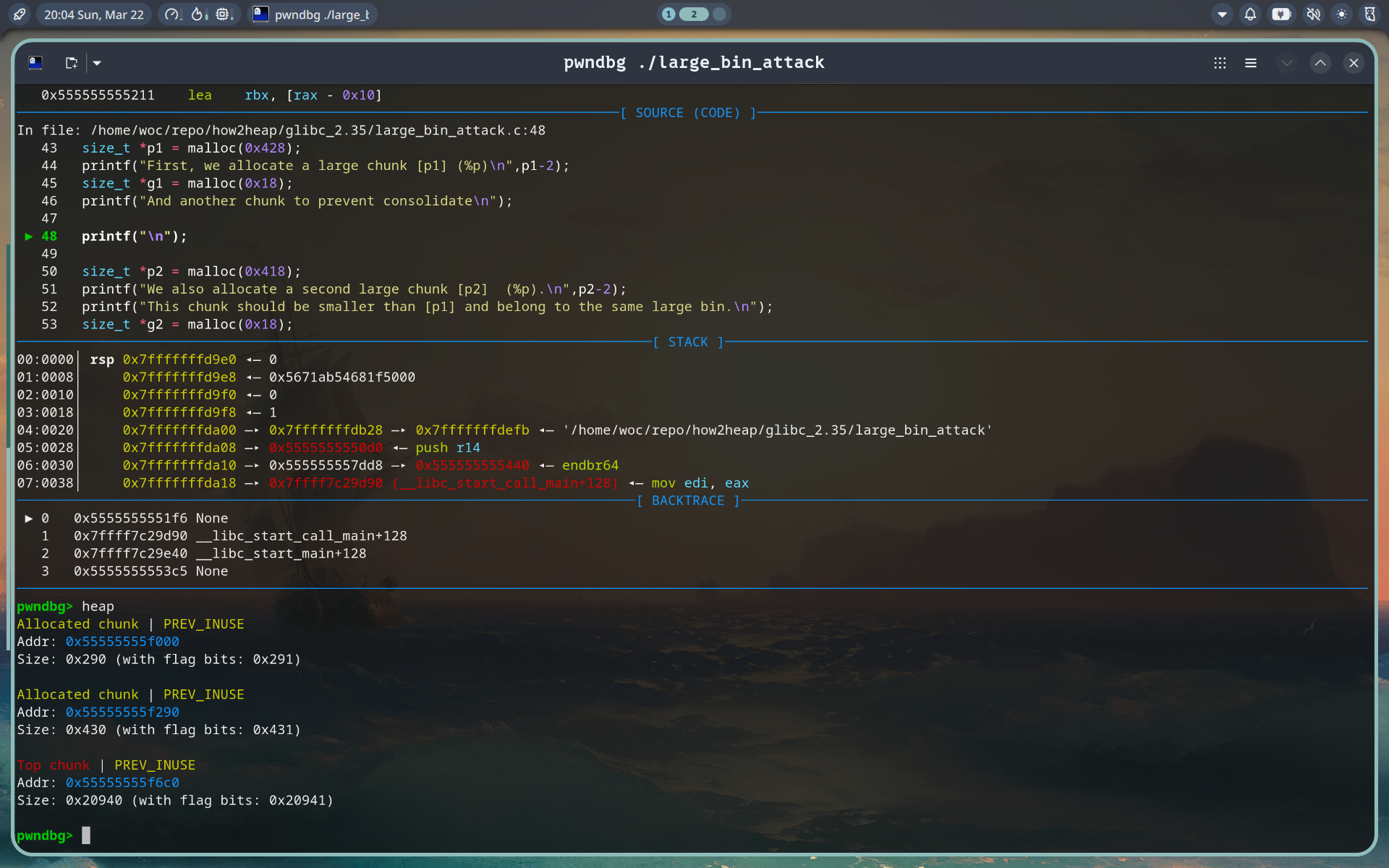 反编译发现:malloc(0x18)确实不存在.
1
2
3
4
5
6
7
8
9
10
11
12
13
14
15
 125 │     11c3:   e8 a8 fe ff ff          call   1070 <printf@plt>
 126 │     11c8:   bf 28 04 00 00          mov    $0x428,%edi
 127 │     11cd:   e8 be fe ff ff          call   1090 <malloc@plt>
 128 │     11d2:   48 8d 3d 0f 11 00 00    lea    0x110f(%rip),%rdi
 129 │     11d9:   48 8d 68 f0             lea    -0x10(%rax),%rbp
 130 │     11dd:   49 89 c4                mov    %rax,%r12
 131 │     11e0:   31 c0                   xor    %eax,%eax
 132 │     11e2:   48 89 ee                mov    %rbp,%rsi
 133 │     11e5:   e8 86 fe ff ff          call   1070 <printf@plt>
 134 │     11ea:   48 8d 3d 27 11 00 00    lea    0x1127(%rip),%rdi
 135 │     11f1:   e8 5a fe ff ff          call   1050 <puts@plt>
 136 │     11f6:   bf 0a 00 00 00          mov    $0xa,%edi
 137 │     11fb:   e8 40 fe ff ff          call   1040 <putchar@plt>
 138 │     1200:   bf 18 04 00 00          mov    $0x418,%edi
 139 │     1205:   e8 86 fe ff ff          call   1090 <malloc@plt>
猜测:Makefile中的-O2将这没有用到的malloc(0x18)给优化掉了. 删去这个选项后,恢复正常
pandoc
pandoc可以进行文件格式的转换(也可以直接指定url),例如从html到markdown:
1
pandoc -f html -t markdown https://www.nesdev.org/obelisk-6502-guide/reference.html
但是直接用url可能会遇到问题(TODO)
1
2
3
4
5
6
7
::::: {.main-wrapper role="main"}
:::: main-content
::: h2
[Enable JavaScript and cookies to continue]{#challenge-error-text}
:::
::::
:::::
先通过curl保存到本地文件,然后再用pandoc:
1
pandoc nes.html -f html -t markdown -o doc/nes.md
zsh匹配的大小写问题
当前目录下存在CLAUDE.md和claude_reusme.txt时,当我cat cla然后按下TAB尝试补全,会出现:claUDE
github上已经有相关的issue:
https://github.com/ohmyzsh/ohmyzsh/issues/4118
里面的回复说是menucomplete这个设置的问题,但是我关掉后还是没有解决.
后来了解到:zsh中的匹配是通过mather-list实现的, 后面跟着多个pattern, 按照从左向后的优先级匹配. 当前我的优先匹配模式是:'m:{[:lower:][:upper:]}={[:upper:][:lower:]}' ,大小写被视为一样的. $ zstyle -L ‘:completion:’ matcher-list zstyle ‘:completion:’ matcher-list ‘m:{[:lower:][:upper:]}={[:upper:][:lower:]}’ ‘r:|=’ ‘l:|= r:|=*’
1
2
3
4
5
6
7
8
9
10
11
12
13
将其改成`zstyle ':completion:*' matcher-list  'm:{a-z}={A-Za-z}'`后,输入`cla`后按下TAB, 首先会补成`claud`,然后再按tab会出现menu供选择.


### niri下steam黑屏的问题
在KDE环境下,steam能正常工作;但是niri中,打开steam后,整个pannel会黑屏.

搜了一下,发现这个问题已经有了解决:
> https://www.reddit.com/r/cachyos/comments/1od0ilt/steam_in_black_screen_while_using_niri_and_cachyos/

TL;DR : 在/usr/bin/steam启动参数后加上`-system-composer`选项.

### 独立于terminal启动程序
在shell配置文件中定义一个launch函数,实现类似于rofi启动一个程序的效果:
launch() { setsid “$@” >/dev/null 2>&1 < /dev/null & disown; }
1
2
3
4
5
6
7
8
9
10
11
然后可以`launch typora .` , 非常方便

### 新terminal的“working-dir inherit”
目前使用的环境是niri + ghostty,绑定`super + u`来启动一个新的terminal
但是这种launch方法本身并不支持环境继承(因为其致力于在任意情况下启动新的terminal,有时候focus并不在某一个现有的terminal上面,所以只能用一些通用的方法)
后来发现ghostty本身默认的快捷键有`ctrl+shift+n`启动新window,并且会继承工作目录.

[TODO]能否用一个命令自动判断两种情况?虽然在niri中能够捕捉focus的窗口并判断,但是ghostty的行为似乎有些古怪,比如可能在一个`~/abc`的ghostty terminal中按下后,第一个instance还是在`~`;但是再切回`~/abc`启动第二个,就会开始继承了. 还有待探索

### WM环境下的polkit
在linux下执行vmware的时候,发现点击network config选项的时候,一直没有反映。猜测是权限问题,用命令行启动,遇到:
==== AUTHENTICATING FOR org.freedesktop.policykit.exec ==== Authentication is needed to run `/usr/bin/vmware-netcfg 5 15 2271362’ as the super user Authenticating as: xxx Password: ==== AUTHENTICATION FAILED ==== Error executing command as another user: Not authorized
This incident has been reported.
1
查阅资料发现,当前用户没有通过polkit提权. 但是systemctl检查polkit,是正常的。问题出在WM环境下,需要额外安装polkit认证代理,比如:
sudo pacman -S polkit-gnome
1
然后临时启动,或者加入WM启动脚本中:
/usr/lib/polkit-gnome/polkit-gnome-authentication-agent-1 &
1
2
3
4
然后再点击高权限按钮,成功弹出认证窗口.

### VMWare网络服务
VMWare添加了虚拟子网,但是ifconfig却找不到。怀疑VMWare network服务运行障碍,查看状态:
○ vmware-networks.service - VMware Networks Loaded: loaded (/usr/lib/systemd/system/vmware-networks.service; enabled; preset: disabled) Active: inactive (dead) since Sun 2026-05-24 05:40:44 EDT; 1min 39s ago Duration: 2d 22h 50min 42.488s Invocation: 9478bc637f7c4a388863d3be950312d8 Process: 2286756 ExecStartPre=/sbin/modprobe vmnet (code=exited, status=1/FAILURE) Process: 2286761 ExecStart=/usr/bin/vmware-networks –start (code=exited, status=0/SUCCESS) Process: 2286778 ExecStop=/usr/bin/vmware-networks –stop (code=exited, status=0/SUCCESS) Mem peak: 4.7M CPU: 42ms
May 24 05:40:44 myarch vmware-networks[2286778]: Stopped NAT service on vmnet0 May 24 05:40:44 myarch vmware-networks[2286778]: Disabled hostonly virtual adapter on vmnet0 May 24 05:40:44 myarch vmware-networks[2286778]: Stopped DHCP service on vmnet1 May 24 05:40:44 myarch vmware-networks[2286778]: Disabled hostonly virtual adapter on vmnet1 May 24 05:40:44 myarch vmware-networks[2286778]: Stopped DHCP service on vmnet8 May 24 05:40:44 myarch vmware-networks[2286778]: Stopped NAT service on vmnet8 May 24 05:40:44 myarch vmware-networks[2286778]: Disabled hostonly virtual adapter on vmnet8 May 24 05:40:44 myarch vmware-networks[2286778]: Stopped all configured services on all networks May 24 05:40:44 myarch systemd[1]: vmware-networks.service: Deactivated successfully. May 24 05:40:44 myarch systemd[1]: Started VMware Networks.
1
手动执行启动流程,第一步就报错:
$ sudo modprobe vmnet modprobe: FATAL: Module vmnet not found in directory /lib/modules/7.0.5-arch1-1
1
2
原来是没有和内核版本匹配的vmnet.ko.
sudo pacman -S linux-headers
1
然后重新编译VMWare模块:
sudo vmware-modconfig –console –install-all
1
但是这一步出错:
(venv14) woc@myarch:~ $ sudo vmware-modconfig –console –install-all [AppLoader] GLib does not have GSettings support.
(process:2291083): GLib-CRITICAL **: 05:48:22.877: g_file_test: assertion ‘filename != NULL’ failed Failed to setup build environment: Header path “(null)” is not a valid directory. (venv14) woc@myarch:~ $ uname -r 7.0.5-arch1-1 (venv14) woc@myarch:~ $ pacman -Q linux linux-headers linux-lts linux-lts-headers linux-zen linux-zen-headers 2>/dev/null linux 7.0.9.arch2-1 linux-headers 7.0.9.arch2-1
1
2
3
4
原来是当前运行内核版本和安装的linux-header不匹配. 需要重启才能使用新内核.
重启后重新编译VMWare模块.

最后加载:
sudo modprobe vmmon sudo modprobe vmnet
1
2
3
4
5
无错误。
重启后VMWare网络正常工作

### 查看占用某个端口的进程
使用`lsof`,注意加sudo,否则可能无法正常执行.
$ sudo lsof -i tcp:8080 COMMAND PID USER FD TYPE DEVICE SIZE/OFF NODE NAME VBoxHeadl 196742 woc 19u IPv4 1345432 0t0 TCP *:http-alt (LISTEN)
1
2
3
4
### vultr代理服务器失效排查
某天我的代理服务器突然失效了,起初怀疑是被校园网封ip了,但是切换成流量发现也ping不通,因此也无法ssh登录。

在vultr instance界面可以开启一个终端,执行tcpdump,监听icmp包:
sudo tcpdump -ni any icmp
1
2
3
然后在我的本机开始ping, 看到服务器端有一些 in / out, 证明服务器能够正常接受并发包,但是其流量发不过来.

在本机用下列命令查看本地的公网ip:
curl -4 ifconfig.me ``` 经过对比,确实就是服务器中reply的目的地址,没有发错.
大概率是ip被墙了