NSSCTF - creack
0x01 pyinstaller-cookie
运行后程序要求输入。尝试反汇编的时候一股浓烈的工业气息扑面而来:
1
2
3
4
5
6
7
8
9
10
11
12
13
14
15
16
17
18
19
20
21
22
23
24
25
26
27
28
29
30
31
32
33
34
35
36
37
38
39
__int64 __fastcall sub_1400040D0(__int64 a1)
{
  ......
  v2 = _acrt_iob_func(2u);
  setbuf(v2, 0i64);
  if ( (int)sub_140003FC0(a1 + 16) < 0 )
    return -1i64;
  v4 = sub_140001A40(a1 + 16);
  *(_QWORD *)(a1 + 8208) = v4;
  v5 = -1;
  if ( v4 )
  {
    v6 = (const char *)(a1 + 4112);
    swprintf((wchar_t *const)(a1 + 4112), 0x1000ui64, Format, (const char *)(a1 + 16));
    goto LABEL_5;
  }
  v17 = (FILE *)sub_140004F90(a1 + 16, "rb");
  v18 = v17;
  if ( !v17 )
  {
LABEL_22:
    sub_140003390(
      "Could not load PyInstaller's embedded PKG archive from the executable (%s)\n",
      (const char *)(a1 + 16));
    return 0xFFFFFFFFi64;
  }
  *(_QWORD *)Buffer = 0xE0B0A0B0D497773i64;
  ......
LABEL_47:
    swprintf(Buffer, 8ui64, aD, v27);
    if ( (int)sub_1400090A0("_PYI_PARENT_PROCESS_LEVEL", Buffer) < 0 )
    {
      sub_140003390("Failed to set _PYI_PARENT_PROCESS_LEVEL environment variable!\n");
      return v5;
    }
    goto LABEL_39;
  }
 ......
}
似乎是某种可执行格式的入口函数。查阅关键词了解到pyinstaller是一种打包技术,用于将python脚本打包成可执行的二进制格式,而且程序的图标也暗示了这一点。

那么当务之急就是寻找解包工具,很快就找到了pyinstxtractor
https://github.com/extremecoders-re/pyinstxtractor
可是运行时却报错:
1
2
3
C:\Users\woc\backup\nssctf>python pyinstxtractor.py ./Creack.exe
[+] Processing ./Creack.exe
[!] Error : Missing cookie, unsupported pyinstaller version or not a pyinstaller archive
既然脚本提到了missing cookie,那就搜索一下相关的代码:
1
2
3
4
5
6
7
8
9
10
11
12
13
14
15
16
17
18
19
20
21
22
23
24
25
26
27
28
29
30
31
32
33
34
35
36
37
38
39
40
41
42
43
44
45
46
47
48
49
50
    PYINST20_COOKIE_SIZE = 24           # For pyinstaller 2.0
    PYINST21_COOKIE_SIZE = 24 + 64      # For pyinstaller 2.1+
    MAGIC = b'MEI\014\013\012\013\016'  # Magic number which identifies pyinstaller

    def checkFile(self):
        print('[+] Processing {0}'.format(self.filePath))

        searchChunkSize = 8192
        endPos = self.fileSize
        self.cookiePos = -1

        if endPos < len(self.MAGIC):
            print('[!] Error : File is too short or truncated')
            return False

        while True:
            startPos = endPos - searchChunkSize if endPos >= searchChunkSize else 0
            chunkSize = endPos - startPos

            if chunkSize < len(self.MAGIC):
                break

            self.fPtr.seek(startPos, os.SEEK_SET)
            data = self.fPtr.read(chunkSize)

            offs = data.rfind(self.MAGIC)

            if offs != -1:
                self.cookiePos = startPos + offs
                break

            endPos = startPos + len(self.MAGIC) - 1

            if startPos == 0:
                break

        if self.cookiePos == -1:
            print('[!] Error : Missing cookie, unsupported pyinstaller version or not a pyinstaller archive')
            return False

        self.fPtr.seek(self.cookiePos + self.PYINST20_COOKIE_SIZE, os.SEEK_SET)

        if b'python' in self.fPtr.read(64).lower():
            print('[+] Pyinstaller version: 2.1+')
            self.pyinstVer = 21     # pyinstaller 2.1+
        else:
            self.pyinstVer = 20     # pyinstaller 2.0
            print('[+] Pyinstaller version: 2.0')

        return True
程序会逆序检索MAGIC字段,如果找不到就会报错。如果成功找到就进一步判读版本号 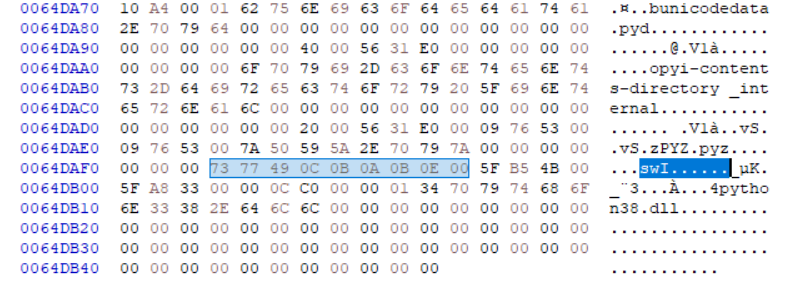 尝试将swI开头的数字改成需要的magic再次运行脚本,然而不幸的是,有很多段都无法解压。
1
2
3
4
5
6
7
8
9
10
11
12
13
14
15
16
17
18
19
20
C:\Users\woc\backup\nssctf>python pyinstxtractor.py ./Creack.exe
[+] Processing ./Creack.exe
[+] Pyinstaller version: 2.1+
[+] Python version: 3.8
[+] Length of package: 6272331 bytes
[+] Found 58 files in CArchive
[+] Beginning extraction...please standby
[!] Error : Failed to decompress struct
[!] Error : Failed to decompress pyimod01_archive
[!] Error : Failed to decompress pyimod02_importers
[!] Error : Failed to decompress pyimod03_ctypes
[!] Error : Failed to decompress pyimod04_pywin32
[!] Error : Failed to decompress pyiboot01_bootstrap
[!] Error : Failed to decompress CreackMe&&FxxMe
[!] Warning: This script is running in a different Python version than the one used to build the executable.
[!] Please run this script in Python 3.8 to prevent extraction errors during unmarshalling
[!] Skipping pyz extraction
[+] Successfully extracted pyinstaller archive: ./Creack.exe

You can now use a python decompiler on the pyc files within the extracted directory
0x02 pyinstaller-TOC
上面的错误引导我们继续搜索”Failed to decompress”
1
2
3
4
5
6
7
8
9
10
11
12
13
14
15
16
17
18
19
20
21
22
23
24
25
26
27
28
29
30
31
32
33
34
35
36
37
38
39
40
41
42
43
44
45
46
47
48
49
50
51
52
53
54
55
56
57
58
59
60
61
62
63
64
65
66
67
68
69
70
71
72
73
74
75
    def extractFiles(self):
        print('[+] Beginning extraction...please standby')
        extractionDir = os.path.join(os.getcwd(), os.path.basename(self.filePath) + '_extracted')

        if not os.path.exists(extractionDir):
            os.mkdir(extractionDir)

        os.chdir(extractionDir)

        for entry in self.tocList:
            self.fPtr.seek(entry.position, os.SEEK_SET)
            data = self.fPtr.read(entry.cmprsdDataSize)

            if entry.cmprsFlag == 1:
                try:
                    data = zlib.decompress(data)
                except zlib.error:
                    print('[!] Error : Failed to decompress {0}'.format(entry.name))
                    # print(data.hex())
                    continue
                # Malware may tamper with the uncompressed size
                # Comment out the assertion in such a case
                assert len(data) == entry.uncmprsdDataSize # Sanity Check

            if entry.typeCmprsData == b'd' or entry.typeCmprsData == b'o':
                # d -> ARCHIVE_ITEM_DEPENDENCY
                # o -> ARCHIVE_ITEM_RUNTIME_OPTION
                # These are runtime options, not files
                continue

            basePath = os.path.dirname(entry.name)
            if basePath != '':
                # Check if path exists, create if not
                if not os.path.exists(basePath):
                    os.makedirs(basePath)

            if entry.typeCmprsData == b's':
                # s -> ARCHIVE_ITEM_PYSOURCE
                # Entry point are expected to be python scripts
                print('[+] Possible entry point: {0}.pyc'.format(entry.name))

                if self.pycMagic == b'\0' * 4:
                    # if we don't have the pyc header yet, fix them in a later pass
                    self.barePycList.append(entry.name + '.pyc')
                self._writePyc(entry.name + '.pyc', data)

            elif entry.typeCmprsData == b'M' or entry.typeCmprsData == b'm':
                # M -> ARCHIVE_ITEM_PYPACKAGE
                # m -> ARCHIVE_ITEM_PYMODULE
                # packages and modules are pyc files with their header intact

                # From PyInstaller 5.3 and above pyc headers are no longer stored
                # https://github.com/pyinstaller/pyinstaller/commit/a97fdf
                if data[2:4] == b'\r\n':
                    # < pyinstaller 5.3
                    if self.pycMagic == b'\0' * 4:
                        self.pycMagic = data[0:4]
                    self._writeRawData(entry.name + '.pyc', data)

                else:
                    # >= pyinstaller 5.3
                    if self.pycMagic == b'\0' * 4:
                        # if we don't have the pyc header yet, fix them in a later pass
                        self.barePycList.append(entry.name + '.pyc')

                    self._writePyc(entry.name + '.pyc', data)

            else:
                self._writeRawData(entry.name, data)

                if entry.typeCmprsData == b'z' or entry.typeCmprsData == b'Z':
                    self._extractPyz(entry.name)

        # Fix bare pyc's if any
        self._fixBarePycs()
解压逻辑是遍历tocList中的条目,如果压缩标准为1,就用zlib解压。上面的报错正是解压失败导致的。
到这里,有很多可能:
或许实际上不需要解压,但是标准却错误的设置为1,但是运行时的逻辑又被魔改,所以能正确运行?
或许某个条目的数据长度不对,导致数据错位?
……
我们需要进一步研究TOC的结构。
1
2
3
4
5
6
7
8
9
10
11
12
13
14
15
16
17
18
19
20
21
22
23
24
25
26
27
28
29
30
31
32
33
34
35
36
37
38
39
40
41
42
43
44
45
46
    def parseTOC(self):
        # Go to the table of contents
        self.fPtr.seek(self.tableOfContentsPos, os.SEEK_SET)

        self.tocList = []
        parsedLen = 0

        # Parse table of contents
        while parsedLen < self.tableOfContentsSize:
            (entrySize, ) = struct.unpack('!i', self.fPtr.read(4))
            nameLen = struct.calcsize('!iIIIBc')

            (entryPos, cmprsdDataSize, uncmprsdDataSize, cmprsFlag, typeCmprsData, name) = \
            struct.unpack( \
                '!IIIBc{0}s'.format(entrySize - nameLen), \
                self.fPtr.read(entrySize - 4))

            try:
                name = name.decode("utf-8").rstrip("\0")
            except UnicodeDecodeError:
                newName = str(uniquename())
                print('[!] Warning: File name {0} contains invalid bytes. Using random name {1}'.format(name, newName))
                name = newName

            # Prevent writing outside the extraction directory
            if name.startswith("/"):
                name = name.lstrip("/")

            if len(name) == 0:
                name = str(uniquename())
                print('[!] Warning: Found an unamed file in CArchive. Using random name {0}'.format(name))

            self.tocList.append( \
                                CTOCEntry(                      \
                                    self.overlayPos + entryPos, \
                                    cmprsdDataSize,             \
                                    uncmprsdDataSize,           \
                                    cmprsFlag,                  \
                                    typeCmprsData,              \
                                    name                        \
                                ))

            parsedLen += entrySize
        print('[+] Found {0} files in CArchive'.format(len(self.tocList)))
其中用到的tableOfContent在别处定义,我们可以增加一条语句来打印其数值
1
2
3
4
5
6
        self.overlaySize = lengthofPackage + tailBytes
        self.overlayPos = self.fileSize - self.overlaySize
        self.tableOfContentsPos = self.overlayPos + toc
        self.tableOfContentsSize = tocLen

        print(hex(self.tableOfContentsPos))
结果是0x64ce33: 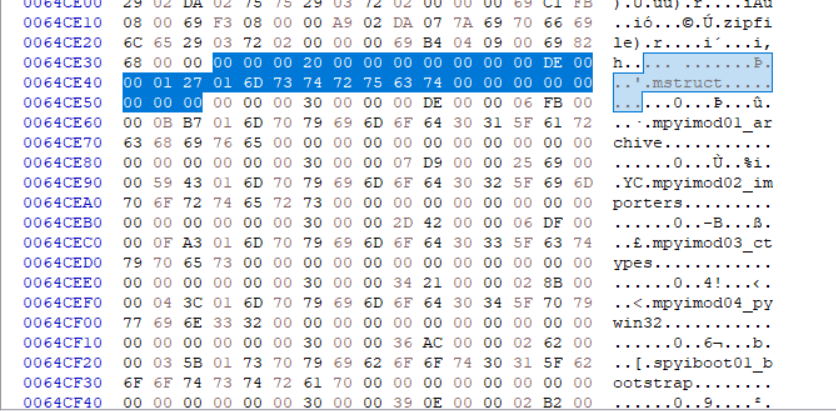 再阅读上面的parseTOC,前4个字节是entry length,第一个条目是0x20, 接着是分别是: (entryPos, cmprsdDataSize, uncmprsdDataSize, cmprsFlag, typeCmprsData, name) entryPos = 0x0,因为是第一个数据段 cmprsdDataSize = 0xDE,这是压缩后的数据大小。而且可以发现下一个数据的的开头刚好是0xDE,无缝对接 uncmprsdDataSize = 0x127为解压后数据 cmprsFlag = 0x1,压缩标准 typeCmprsData = ‘m’ ,代表数据类型,module name = ‘struct’,模块名称
接下来试着找无法正确解压的模块特征,发现开头都是一串固定的二进制数据:73 77 64 64 D2 70
我当时的想法是:或许数据经过某种特殊压缩工具处理,产物开头是这种工具的MAGIC,甚至可能不是zlib压缩
0x03 发现加密代码(纯属意外)
就在我感到迷茫的时候,点击修改cookie后的二进制程序发现无法正确运行了,这说明自定义的启动器是会对swI开头的MAGIC进行强制检查的。在ida中搜索对立即数 s的引用(需要勾选”any untyped value”,这会把写死在代码操作数中的数据显示出来): 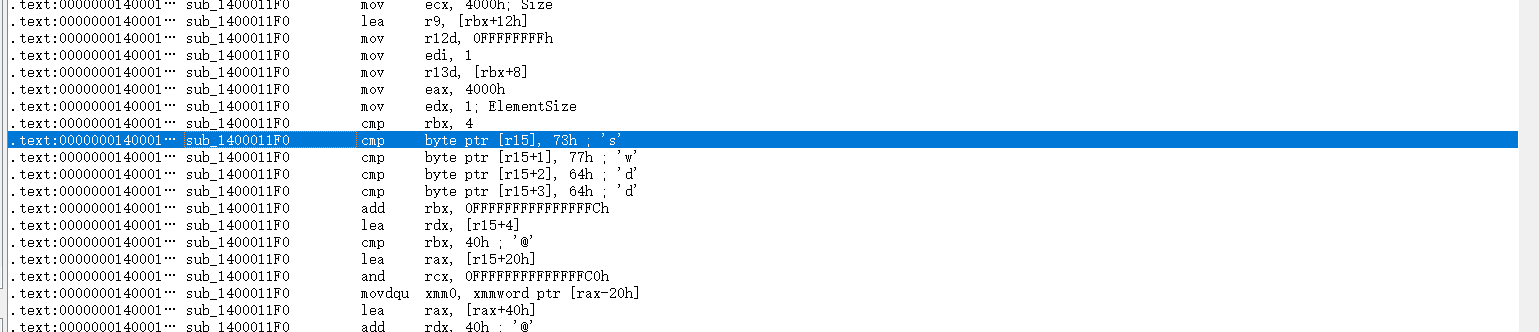 其中显眼的
其中显眼的 swdd正式自己看到的固定数据头73 77 64 64,赶紧追踪进去看一看:
1
2
3
4
5
6
7
8
9
10
11
12
13
14
15
16
17
18
19
20
21
22
23
24
25
26
27
28
29
30
31
32
33
34
35
36
37
38
39
40
41
42
43
44
45
46
47
48
49
50
51
52
53
54
55
56
57
58
59
60
61
62
63
64
65
66
67
68
69
70
71
72
73
74
75
76
77
78
79
80
81
82
83
84
85
86
87
88
89
90
91
92
93
94
95
96
97
98
99
100
101
102
103
104
105
106
107
108
109
110
111
112
113
114
115
116
117
118
119
120
121
122
123
124
125
126
127
128
129
130
131
132
133
134
135
136
137
138
139
140
141
142
143
144
145
146
147
148
149
150
151
152
153
154
155
156
157
158
159
160
161
162
163
164
165
166
167
168
169
170
171
172
173
174
__int64 __fastcall sub_1400011F0(FILE *a1, __int64 a2, FILE *a3, __int64 a4)
{
  void *v6; // rbp
  unsigned int v8; // eax
  unsigned int v9; // r12d
  __m128i *v11; // r15
  int *v12; // rax
  int *v13; // rax
  int v14; // edi
  unsigned __int64 v15; // r13
  __m128 si128; // xmm6
  size_t v17; // rbx
  unsigned __int64 v18; // rdx
  const __m128i *v19; // rax
  __m128 v20; // xmm0
  __m128i *v21; // rax
  size_t v22; // rcx
  unsigned int v23; // eax
  unsigned int v24; // edi
  size_t v25; // rbx
  int v26; // [rsp+20h] [rbp-B8h]
  __m128i *v27; // [rsp+30h] [rbp-A8h] BYREF
  int v28; // [rsp+38h] [rbp-A0h]
  void *v29; // [rsp+40h] [rbp-98h]
  unsigned int v30; // [rsp+48h] [rbp-90h]
  __int64 v31; // [rsp+60h] [rbp-78h]
  __int64 v32; // [rsp+68h] [rbp-70h]
  __int64 v33; // [rsp+70h] [rbp-68h]

  v31 = 0i64;
  v32 = 0i64;
  v33 = 0i64;
  v28 = 0;
  v6 = 0i64;
  v27 = 0i64;
  v8 = sub_14000C390(&v27, "1.3.1", 88i64);
  v9 = v8;
  if ( v8 )
  {
    sub_140003390("Failed to extract %s: inflateInit() failed with return code %d!\n", (const char *)(a2 + 18), v8);
    return 0xFFFFFFFFi64;
  }
  v11 = (__m128i *)j__malloc_base(0x4000ui64);
  if ( v11 )
  {
    v6 = j__malloc_base(0x4000ui64);
    if ( !v6 )
    {
      v13 = errno();
      sub_140003560(
        "malloc",
        (unsigned int)*v13,
        "Failed to extract %s: failed to allocate temporary output buffer!\n",
        (const char *)(a2 + 18));
      goto LABEL_42;
    }
    v9 = -1;
    v14 = 1;
    v15 = *(unsigned int *)(a2 + 8);
    si128 = (__m128)_mm_load_si128((const __m128i *)&xmmword_14002EA50);
    v26 = 1;
LABEL_8:
    v17 = v15;
    if ( v15 > 0x4000 )
      v17 = 0x4000i64;
    if ( fread(v11, 1ui64, v17, a1) != v17 || ferror(a1) )
      goto LABEL_42;
    v15 -= v17;
    if ( !v14 )
    {
LABEL_26:
      v28 = v17;
      v27 = v11;
      while ( 1 )
      {
        v29 = v6;
        v30 = 0x4000;
        v23 = sub_14000A7D0(&v27, 0i64);
        v24 = v23;
        v9 = -1;
        if ( v23 + 4 <= 2 )
          break;
        if ( v23 == 2 )
        {
          v24 = -3;
          break;
        }
        v25 = 0x4000i64 - v30;
        if ( a3 )
        {
          if ( fwrite(v6, 1ui64, v25, a3) != v25 || ferror(a3) )
          {
            v24 = -1;
            break;
          }
        }
        else if ( a4 )
        {
          sub_14002C220(a4, v6, v25);
          a4 += v25;
        }
        if ( v30 )
        {
          if ( v24 == 1 )
          {
            v9 = 0;
            goto LABEL_42;
          }
          if ( v15 )
          {
            v14 = v26;
            goto LABEL_8;
          }
          break;
        }
      }
      sub_140003390("Failed to extract %s: decompression resulted in return code %d!\n", (const char *)(a2 + 18), v24);
      goto LABEL_42;
    }
    if ( v17 >= 4
      && v11->m128i_i8[0] == 115
      && v11->m128i_i8[1] == 119
      && v11->m128i_i8[2] == 100
      && v11->m128i_i8[3] == 100 )
    {
      v17 -= 4i64;
      sub_14002C220(v11, (char *)v11->m128i_i64 + 4, v17);
      v18 = 0i64;
      if ( v17 )
      {
        if ( v17 < 0x40 )
          goto LABEL_23;
        v19 = v11 + 2;
        do
        {
          v20 = (__m128)_mm_loadu_si128(v19 - 2);
          v19 += 4;
          v18 += 64i64;
          v19[-6] = (const __m128i)_mm_xor_ps(si128, v20);
          v19[-5] = (const __m128i)_mm_xor_ps((__m128)_mm_loadu_si128(v19 - 5), si128);
          v19[-4] = (const __m128i)_mm_xor_ps((__m128)_mm_loadu_si128(v19 - 4), si128);
          v19[-3] = (const __m128i)_mm_xor_ps(si128, (__m128)_mm_loadu_si128(v19 - 3));
        }
        while ( v18 < (v17 & 0xFFFFFFFFFFFFFFC0ui64) );
      }
      if ( v18 < v17 )
      {
LABEL_23:
        v21 = &v11[v18 / 0x10];
        v22 = v17 - v18;
        do
        {
          v21->m128i_i8[0] ^= 0xAAu;
          v21 = (__m128i *)((char *)v21 + 1);
          --v22;
        }
        while ( v22 );
      }
    }
    v26 = 0;
    goto LABEL_26;
  }
  v12 = errno();
  sub_140003560(
    "malloc",
    (unsigned int)*v12,
    "Failed to extract %s: failed to allocate temporary input buffer!\n",
    (const char *)(a2 + 18));
LABEL_42:
  sub_14000C070(&v27);
  free(v11);
  free(v6);
  return v9;
}
在这里我们可以发现对 swdd开头数据的特殊处理:忽略前4个字节,然后与 0xAA进行异或
修改我们的extractFile逻辑:
1
2
3
4
5
6
7
8
9
10
11
12
13
14
15
            if entry.cmprsFlag == 1:
                try:
                    if data.startswith(b'swdd'):
                        data = data[4:]
                        result = bytes([b ^ 0xAA for b in data])
                        data = zlib.decompress(result)
                    else:
                        data = zlib.decompress(data)
                except zlib.error:
                    print('[!] Error : Failed to decompress {0}'.format(entry.name))
                    # print(data.hex())
                    continue
                # Malware may tamper with the uncompressed size
                # Comment out the assertion in such a case
                assert len(data) == entry.uncmprsdDataSize # Sanity Check
然后就能成功解压了!反编译CreackMe&&FxxMe.pyc,后面就索然无味了
0x04 总结
这一题探索新文件格式的过程非常有趣,对于脚本文件,直接在源码中搜索报错信息会很容易。
在发现无法解压的数据都是固定的开头后,接下来有多种假设方向:
固定标志,进行特殊处理。如果这样想,那肯定能想到直接搜索立即数
某个压缩结构的开头标志
在研究的过程中,我其实假设的是后者。而且我的本意是搜索swI,然后逐渐向内部寻找解压逻辑,却无意间发现了对swdd的比较。
但事后仔细想想,就算是压缩后的文件头,凭什么就不能搜索试试看呢?自己为什么没有往这方面想?或许是自己潜意识中,复杂的压缩算法意味着第三方库或者复杂的自定义模块,从而没有很容易地想到搜索。如果自己真的找到了某个压缩模块,一步步跟踪调用链,或许也会有新的发现。不管怎样,都是值得一试的。
很多时候,思路在逻辑上能够推理,但是自己未必能从直觉上发现它。“感觉”会让自己优先尝试哪些看起来“不那么麻烦”的路,而忽略哪些在目前看来仅仅存在“可能”的路。
而且问题的解决不是线性的,当自己有很多条路的时候,可以优先选择那些期望更大的;然而在缺少思路的时候,这种思维惯性可能会断送自己的前路——何必抱着成功的执念?把目标降低一些,把如何才能成功改成如何就能有更多的发现,去尝试那些小路——至少总比原地发呆要好吧!而且说不准什么时候,就把自己引到了大路上呢。